Some machines are not reachable in the wapt-console.

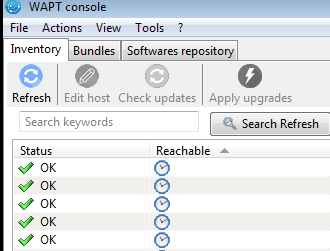
We have problems with some machines in wapt-console, and in the column where it normally says "OK" or "DISCONNECTED", for some machines we just have the icon of a clock, see screenshot. The machines are online, and when we reboot them, they get all the packages from the wapt-server they should have. Where and how can we troubleshoot this? On the wapt-server (1.5.1.26 on Debian stretch), or on the windows machine running the wapt-console? We have 80 machines, and about 3-4 of them have this problem. We have tried reinstalling the wapt-agent. -- Klaus Ade Johnstad 67E61D18B2C44F8A3DA35C6D849F9F5F 26FA477D
Den 13.09.2018 13:10, skrev Klaus Ade Johnstad: I just found this forum-post: "[RESOLVED] clock icon stuck on reachable column" https://forum.tranquil.it/viewtopic.php?t=957 I will try that.
Where and how can we troubleshoot this? On the wapt-server (1.5.1.26 on Debian stretch), or on the windows machine running the wapt-console?
-- Klaus Ade Johnstad 67E61D18B2C44F8A3DA35C6D849F9F5F 26FA477D

Clock icon has actually (too) many meanings... * Host has never been able to connect to the server (with websockets) (for example if it is not properly authorized, or not the right version or wapt service is malfunctioning because some files has been removed by antivirus...) * An action has been trhown to the host (though an established websocket connection) but the host has not acknowledged within a defined timeout (because host is busy doing something else, or because server is busy getting all the hosts aknowledgements) * An action is performed on the host and is not finished yet (example : windows updates scan) Le 13/09/2018 à 13:21, Klaus Ade Johnstad a écrit :
Den 13.09.2018 13:10, skrev Klaus Ade Johnstad: I just found this forum-post: "[RESOLVED] clock icon stuck on reachable column"
https://forum.tranquil.it/viewtopic.php?t=957 I will try that.
Where and how can we troubleshoot this? On the wapt-server (1.5.1.26 on Debian stretch), or on the windows machine running the wapt-console?

Isn't there also a clock/date sync problem ? Le 13 sept. 2018 16:31, Hubert TOUVET <htouvet@tranquil.it> a écrit : Clock icon has actually (too) many meanings... * Host has never been able to connect to the server (with websockets) (for example if it is not properly authorized, or not the right version or wapt service is malfunctioning because some files has been removed by antivirus...) * An action has been trhown to the host (though an established websocket connection) but the host has not acknowledged within a defined timeout (because host is busy doing something else, or because server is busy getting all the hosts aknowledgements) * An action is performed on the host and is not finished yet (example : windows updates scan) Le 13/09/2018 à 13:21, Klaus Ade Johnstad a écrit : Den 13.09.2018 13:10, skrev Klaus Ade Johnstad: I just found this forum-post: "[RESOLVED] clock icon stuck on reachable column" https://forum.tranquil.it/viewtopic.php?t=957 I will try that. Where and how can we troubleshoot this? On the wapt-server (1.5.1.26 on Debian stretch), or on the windows machine running the wapt-console?
participants (3)
-
 Hubert TOUVET
 -
 Klaus Ade Johnstad
 -
 MORILLO Jordi